עקב המצב הביטחוני יתכנו עיכובים במשלוחים.

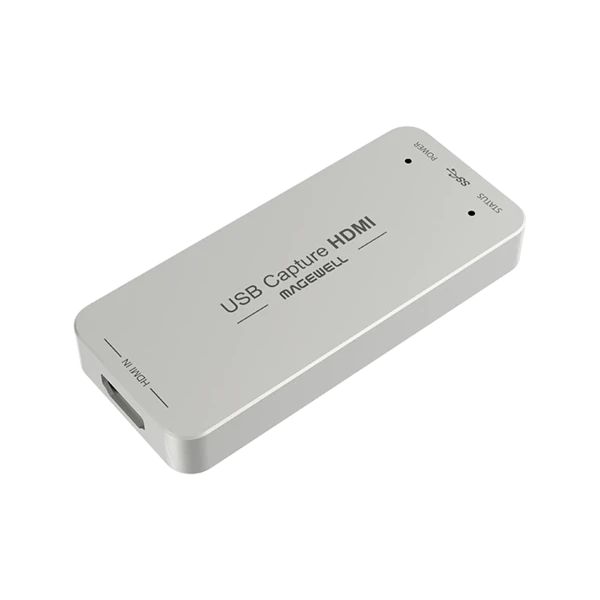
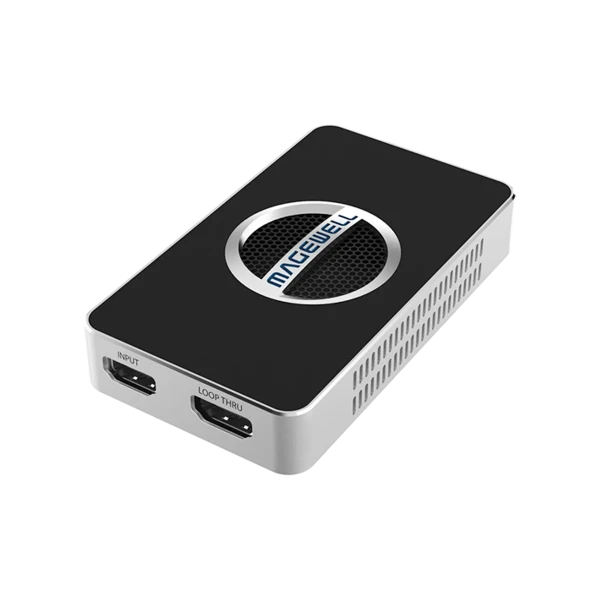
כרטיס לכידת וידאו Magewell USB Capture HDMI Gen 2

כרטיס לכידת וידאו מקצועי מבית Magewell עם חיבור USB, המאפשר קליטה והמרה של אות HDMI ישירות למחשב בצורה מהירה ויציבה. מספק איכות תמונה גבוהה ותמיכה ברזולוציות מתקדמות - פתרון מושלם לשידורים חיים, סטרימינג והקלטות וידאו מקצועיות.

קיים במלאי

אפשרויות איסוף ומשלוח
  • איסוף עצמי מחנות ראש העין – בתיאום מראש 0 ₪
  • משלוח עד הבית – 3–10 ימי עסקים 50 ₪

כרטיס לכידת וידאו HDMI ל-USB 3.0 – מקצועי להזרמה, הקלטה ושידור חי

כרטיס לכידת וידאו HDMI מתקדם המיועד ליוצרי תוכן, סטרימרים, אולפני וידאו, מערכות וידאו מקצועיות וחדרי ישיבות. מאפשר לכידה והמרה באיכות גבוהה במיוחד עם תמיכה בקצבי פריימים גבוהים, עיבוד וידאו מתקדם ותאימות רחבה לתוכנות ושיטות עבודה מקצועיות.

✨ יתרונות מרכזיים

  • לכידת וידאו HDMI באיכות גבוהה עד 2048×2160

  • תמיכה ב-עד 120fps – אידיאלי לגיימינג, ספורט ותוכן דינמי

  • חיבור USB 3.0 מהיר (תואם גם USB 2.0 / 3.1 Gen 1)

  • תמיכה מלאה ב-Windows, macOS, Linux ו-Chrome OS

  • תאימות מלאה ל-OBS, Zoom, Teams, VLC, XSplit ועוד


🎥 מפרט כניסת HDMI

  • מקלט HDMI עד 165M, רזולוציה מקסימלית: 2048×1080 @60fps 4:4:4

  • ממשק HDMI 1.4a

  • תמיכה ב-RGB / YUV 4:4:4 ב-8/10/12bit

  • YUY 4:2:2 ב-12bit

  • EDID מותאם אישית

  • עד 8 ערוצי אודיו HDMI באיכות 24bit / 192kHz


⚙️ יכולות עיבוד ולכידה

  • צינור עיבוד וידאו עד 160M פיקסלים לשנייה

  • לכידת וידאו עד 2048×2160 @120fps

  • תמיכה ברזולוציות נפוצות:

    • 1080p עד 75fps

    • 720p עד 120fps

    • PAL / NTSC

  • פורמטי וידאו: YUY2 / UYVY / RGB24 / RGB32

  • עיבוד מתקדם:

    • חיתוך וידאו (Crop)

    • הגדלה / הקטנה (Scaling)

    • De-Interlacing

    • שינוי יחס תצוגה

    • המרת צבעים

    • שינוי קצב פריימים

    • Flip & Mirror


🔊 אודיו

  • עד 2 ערוצי אודיו IEC60958

  • תאימות מלאה לאודיו משובץ HDMI


🧩 תוכנה, SDK ו-API

  • תוכנת USB Capture Utility:

    • הגדרות מתקדמות

    • עדכון קושחה

    • אבחון תקלות

  • MWCapture SDK לפיתוח מקצועי

  • APIs נתמכים:

    • Windows: DirectShow / WASAPI / DirectSound

    • Linux: V4L2 / ALSA

    • macOS: AVCaptureSession / AudioUnit


💻 תאימות תוכנות

  • OBS Studio

  • Zoom Rooms

  • Microsoft Teams

  • Skype for Business

  • Google Hangouts

  • GoToMeeting

  • VLC

  • XSplit

  • QuickTime Player

  • וכל תוכנה מבוססת DirectShow / V4L2 / AVCaptureSession


🖥️ מערכות הפעלה נתמכות

  • Windows 10 / 11 / Server 2016–2025

  • Linux (x86 / x64 / ARM)

  • macOS 10.9 ומעלה

  • Chrome OS


🔌 חיבורים ומבנה

  • יציאה: USB 3.0

  • מידות: 92.2 × 40.2 × 12.3 מ״מ

  • צריכת חשמל: עד 2.5W

  • כבל כלול: USB 3.0 (63 ס״מ)


🌡️ תנאי עבודה

  • טמפרטורת עבודה: 0°–50°C

  • אחסון: -20°–70°C

  • לחות: 5%–90% ללא עיבוי


🔔 חיווי LED

  • מהבהב לאט – אין נעילת אות

  • דולק קבוע – אות תקין

  • הבהוב כפול – שגיאת זיכרון / FPGA

  • כבוי – בעיית קושחה או מתח


🎯 מושלם עבור:

  • סטרימינג מקצועי

  • הקלטת וידאו באיכות גבוהה

  • חדרי ישיבות ו-AV

  • גיימינג תחרותי

  • אולפני תוכן ופודקאסטים


Input Features

  • 165M HDMI receiver, max input 2048×1080 60fps 4:4:4
  • Custom EDID
  • Input RGB/YUV 4:4:4 8/10/12-bit, YUY 4:2:2 12-bit
  • Up to 8-channel 24-bit HDMI-embedded audio at 192kHz
  • HDMI interfaces: HDMI 1.4a

Process and Capture Features

  • Video processing pipeline up to 160M pixels/s
  • Capture videos up to 2048×2160, frame rates up to 120fps. Outputs include (actual capture frame rate can be limited by the USB bandwidth and internal working frequency.):
    • 1920x1080p 23.98/24/25/29.97/30/50/59.94/60/75
    • 1280x720p 23.98/24/25/29.97/30/50/59.94/60/100/119.88/120
    • 720x576p25
    • 720x480p30
  • Support for YUY2/UYVY/RGB24/RGB32
  • Support video cropping, up/down scaling, de-interlacing, aspect ratio conversion, color format conversion, frame rate conversion, flip and mirror
  • Up to 2-channel IEC60958 audio streams

Included Software

  • USB Capture Utility enables users to easily check and set the capture-related parameters, upgrade firmware of the capture device and export info needed for troubleshooting

SDK & APIs

  • The MWCapture SDK provides functions including signal status extraction, capture configuration and real-time audio & video capture, etc.
  • Windows DirectShow/Wave API/DirectSound/WASAPI
  • Linux V4L2/ALSA
  • macOS AVCaptureSession/AudioUnit

Output Interface

  • USB 3.0
    • compatible with USB 2.0
    • compatible with USB 3.1 Gen 1

Compatible Software

  • Zoom Rooms
  • Microsoft Teams
  • Skype for Business
  • Google Hangouts
  • GoToMeeting
  • Gstreamer
  • VLC
  • OBS Studio
  • XSplit
  • QuickTime Player
  • Any other DirectShow/V4L2/AVCaptureSession based encoding or streaming software

Recommended OS

  • Windows 10/11/Server 2016/Server 2019/Server 2022/Server 2025 (x86 & x64) and above
  • Linux x86, x64 & ARM architecture, with 2.6.35 and above
  • Mac OS X 10.9 and above
  • macOS 10.12 and above
  • Chrome OS

LED Indicator

  • Status LEDs indicate the working state of each channel:
    • Pulsing slowly: input signal unlocked
    • On: input signal locked
    • Double blinks: memory failed or FPGA configuration failed
    • Off: firmware or power supply abnormal

Form Factor

  • 92.2mm (L) x 40.2mm (W) x 12.3mm (H)

Accessories

  • 1 × USB 3.0 cable (63cm)

Power Consumption

  • 5V max current: ~0.5 A
  • Max power consumption: ~2.5 W

Working Environment

  • Operating temperature: 0 to 50 deg C
  • Storage temperature: -20 to 70 deg C
  • Relative Humidity: 5% to 90% non-condensing
הנצפים ביותר

תפריט נגישות